Stand Lua脚本安装
Stand Lua脚本在线仓库安装与本地手动部署完整教程
前言
💡温馨提示
- 使用安装器安装后,会自带安装一些Lua,如果你想要添加其他Lua,请查看下方教程
- 推荐优先使用STAND菜单的脚本仓库来加载LUA,后续更新更加方便
- 脚本属于第三方内容,请自行甄别安全性,恶意脚本造成账户封禁后果自负
- 教程可能具有时效性,若不适用请及时联系我
游戏内仓库安装步骤
路径:Stand > Lua脚本 > 仓库,选择你想要加载的Lua。推荐使用此方法,后续Lua更新后也可以直接从仓库内更新

如果Stand仓库下载Lua失败
点击进入Stand官方仓库列表
常用脚本清单参考:
- Musiness Banager
- Heist Control
- LanceScript
- Chinese.lua
- JinxScript
- JinxScript 0.50
- Dolos
- Dolos 5.2.0
如github访问困难,可以修改hosts解析:
104.21.48.235 Stand.gg
172.67.188.90 Stand.gg
172.67.131.138 iptoasn.com
185.199.108.133 raw.githubusercontent.com
185.199.109.133 raw.githubusercontent.com
185.199.110.133 raw.githubusercontent.com
185.199.111.133 raw.githubusercontent.com
20.205.243.166 GitHub.com
172.67.188.90 Stand.gg
172.67.131.138 iptoasn.com
185.199.108.133 raw.githubusercontent.com
185.199.109.133 raw.githubusercontent.com
185.199.110.133 raw.githubusercontent.com
185.199.111.133 raw.githubusercontent.com
20.205.243.166 GitHub.com
hosts操作命令(管理员CMD)
cd drivers\etc
notepad hosts
ipconfig /flushdns
notepad hosts
ipconfig /flushdns
Stand手动安装
Stand Lua脚本合集下载
内含众多脚本文件 | 不定时更新
下载解压至Stand Lua目录
以下教程仅以WiriScript Lua做例子,其他脚本请自行举一反三
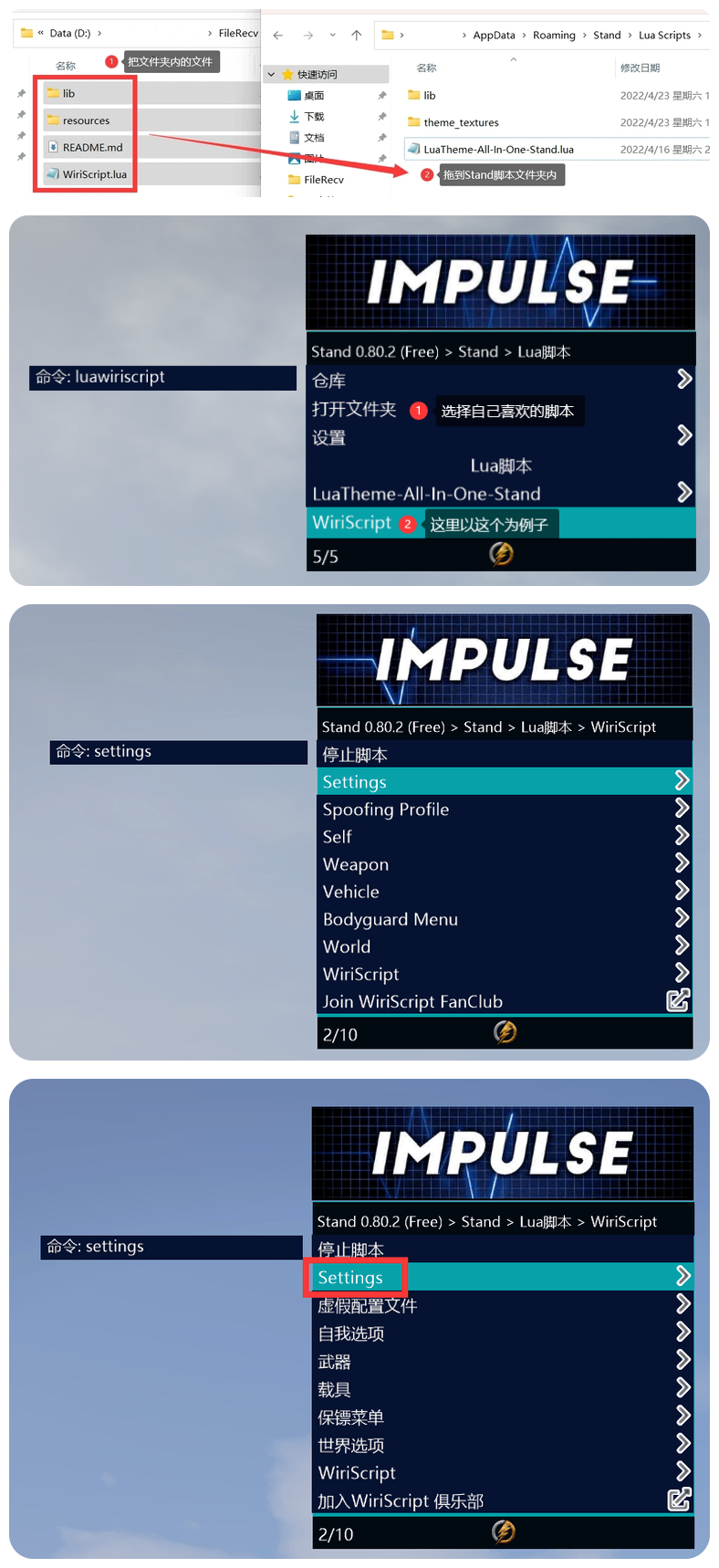
- 把脚本文件夹/单个.lua文件放入
%appdata%\Roaming\Stand\LuaScripts - 进入游戏,打开菜单:Stand > Lua脚本
- 找到对应脚本名称,选中加载即可
设置Lua脚本中文(WiriScript示例)
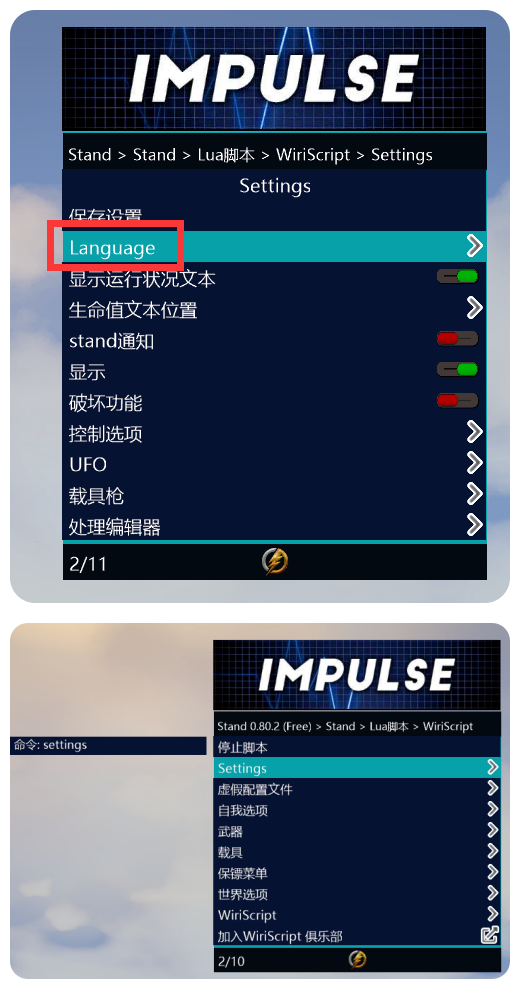
- 加载 WiriScript
- 进入 WiriScript > Settings
- 找到 Language
- 切换简体中文,保存设置